
KNEAD
Give the sound room.
Use Knead to shape body, presence and air. Give a thin vocal more weight or make space in a crowded piano part.
Hamstersound / SCULPT
Coming soon
More body in a voice. A bass line that carries. An acoustic guitar that stays clear without the sting. Shape the sound with audio clay while SCULPT analyses the material: from tonal balance and dynamics to tempo and musical key.
Explore the workflow14-day free demoHear the difference in your own mix.
Sometimes you want to start with the music, before frequencies, curves and settings. Bring a voice closer, or soften the way a guitar lands. SCULPT lets you shape the sound by moulding its material. Underneath, our own Hamstersound engines handle EQ, harmonics and resonance control.
A thin vocal, a bass that gets lost, a guitar that stings: work on the part of the sound you want to change.
ANALYSIS / AUTO
SCULPT analyses the incoming audio: its low, mid and high frequency balance, average level, the relationship between peaks and body, tempo and likely musical key.
When the tempo estimate is sufficiently confident, Auto uses the pulse to set the Glue release. A driving drum group gets a different starting point from a slowly played piano part.
The key estimate gives you extra context for a bass line, vocal or complete mix. You can see it in Learning; automatic tone suggestions are based on the measured spectrum, level and your chosen tonal direction.
Auto gradually moves the settings towards its suggestion, then compares input and output levels. Listen to the change, refine it and take control with your own edit.
The shape controls four of our own Hamstersound engines: EQ, harmonic colour, local resonance control and bus compression. Work on the body of a vocal, the overtones of a bass or the cohesion of a drum group. Each gesture changes real audio parameters, with detail views for precise adjustments.
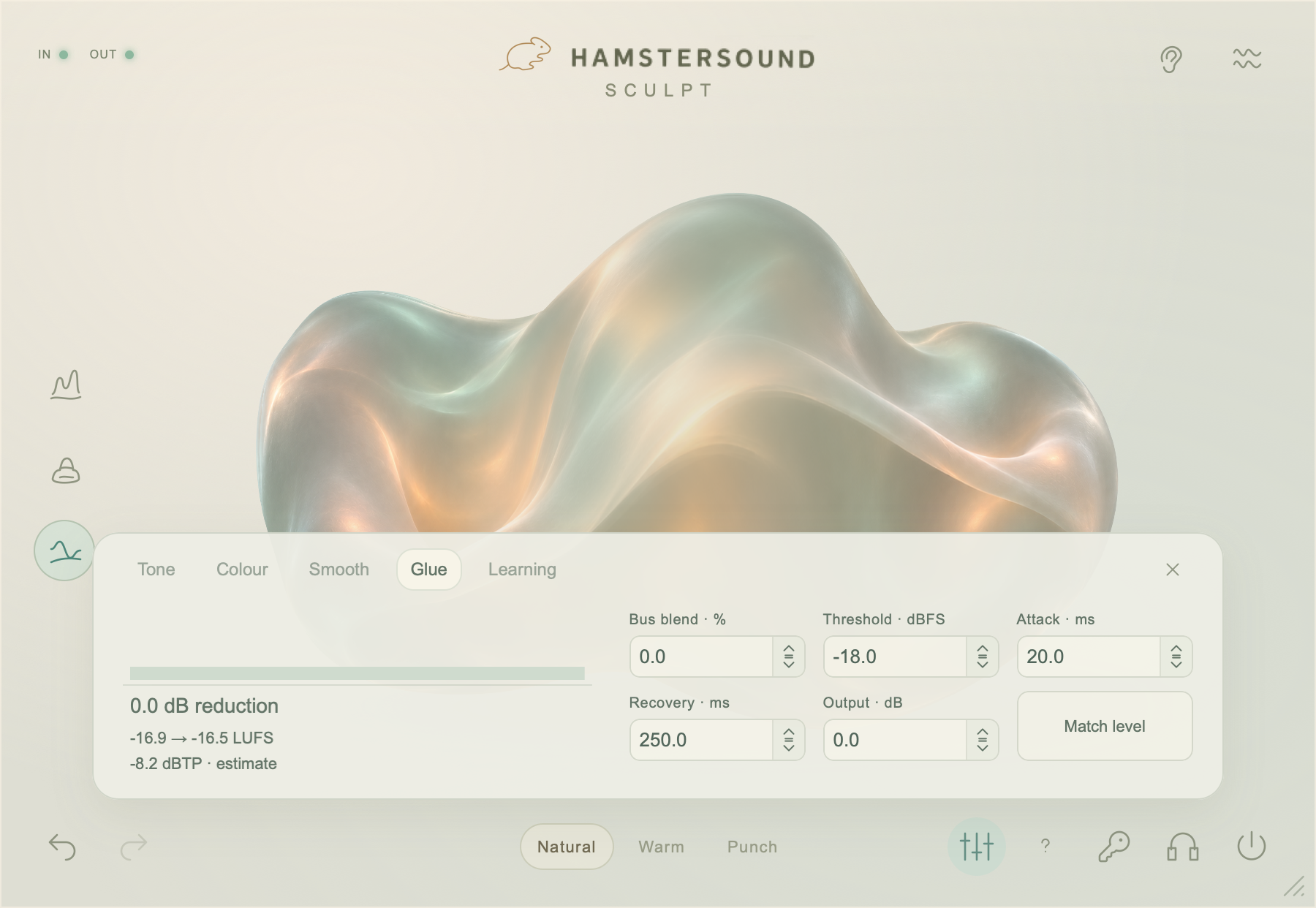
GLUE / ANALOG
Add optional Glue to a drum group, layered guitars or a horn section. Bus compression gives you another way to shape their shared movement. Analog brings a fixed tonal palette to the EQ processing. You choose whether it fits the music, and how much to use.
AUTO / NATURAL / WARM / PUNCH
Auto listens to the incoming sound and gradually adapts the processing. Natural, Warm and Punch offer different starting points. Editing the sound yourself hands control back to you. Your ears make the final decision.
SCULPT is intended for playback, production and mixing. Its fixed latency is 2141 samples: approximately 44.6 ms at 48 kHz. Use it preferably while editing and mixing, in a DAW with delay compensation. Mono and stereo are supported.
Coming soon
SCULPT / FAQ
About the controls, engines and availability.
Not yet. SCULPT is announced as coming soon. Downloading and purchasing are not available at the moment.
A question about SCULPT?KNEAD shapes the balance of body, presence and air. BUILD adds harmonic colour. SMOOTH softens local resonances. The shape controls operate dedicated audio engines with parameters you can refine in the detailed views.
Give a thin vocal more body, help a bass carry with harmonic colour, or soften a harsh acoustic guitar or saxophone note. Optional GLUE bus compression also lets you give a drum bus, layered guitars or a horn section more shared movement.
SCULPT analyses both. When the tempo estimate is sufficiently confident, Auto uses the pulse as a starting point for Glue release. The estimated key provides context in Learning. Automatic tonal suggestions are based on spectrum, level and the selected tonal direction.
Yes. Auto gradually moves the settings towards a suggestion, then compares input and output levels. Listen to the change and take over with your own adjustment. Natural, Warm and Punch offer different starting points; your ears make the final decision.
SCULPT is designed for production, playback and mixing. Its fixed latency is 2141 samples, approximately 44.6 ms at 48 kHz. Prefer using it for editing and mixing in a DAW with delay compensation. Mono and stereo are supported.