
Measure four seconds
LEVEL analyzes the source before its own gain correction. Pick a target and receive a fixed correction that can turn the signal up or down.
TONE UTILITY / LEVEL
Coming soonBring a quiet recording up or a loud track down. LEVEL moves your source towards a chosen average level before further processing. Choose a profile, analyze a representative passage and let the fixed gain correction do the preparation.
Want to follow changing levels during playback too? Enable optional Ride and decide how much movement to allow.
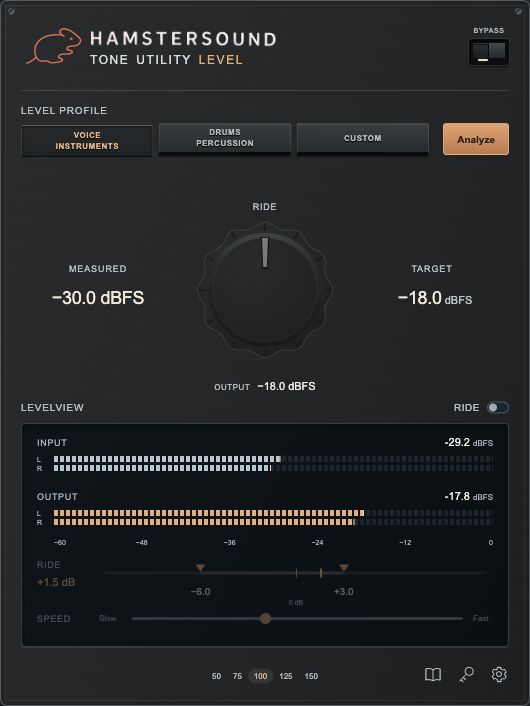
LEVEL analyzes the source before its own gain correction. Pick a target and receive a fixed correction that can turn the signal up or down.
Ride starts off. Enable it to follow level changes, with independent upward and downward correction limits.
Native impulse tests measure zero samples of added latency. Four seconds is the analysis time, not an audio-path delay.
GAIN STAGING
A previous valid correction remains in place during a new analysis until the replacement is ready. Analysis waits for playback when transport is stopped; Esc cancels capture. Changed source material or a different upstream processing chain needs a new analysis.
PROFILES & MEASUREMENT
| Profile | RMS target | Control |
|---|---|---|
| Voice / Instruments | −18 dBFS | A direct starting point for vocals and instruments. |
| Drums / Percussion | −25 dBFS | A practical starting point for transient-rich material. |
| Custom | −36 to −6 dBFS | Direct numeric entry, including a decimal comma. Enter commits; Esc restores. |
These profiles are practical starting points, not universally optimal levels for every recording. Measurement is unweighted RMS with AES17 calibration: a full-scale sine reads 0 dBFS. Stereo analysis takes the higher channel RMS and applies one linked gain, retaining the left/right balance.
Measured holds the source RMS; Target is the chosen average. Live Output RMS uses a shorter averaging window and need not match Target at every instant. RMS is not LUFS and does not guarantee equal perceived loudness.
OPTIONAL RIDE
The fixed analysis correction sets your starting point. When enabled, Ride adds a smoothly changing correction. The large Ride knob controls only the strength of that dynamic correction; turning it to zero leaves the fixed analysis gain intact.
Set maximum downward and upward correction separately, from 0 to 12 dB each. Drag the limit markers directly on the Ride rail.
Speed determines how quickly Ride responds. Start slowly and listen for movement that suits the performance.
Below the detector threshold, Ride stops chasing quiet material and gradually returns its extra correction towards zero. It does not attenuate or mute the audio.
Ride deliberately changes the level envelope and therefore dynamics. Horizontal Input and Output meters show sample peaks; the separate Ride scale shows gain correction in dB.
SETTINGS
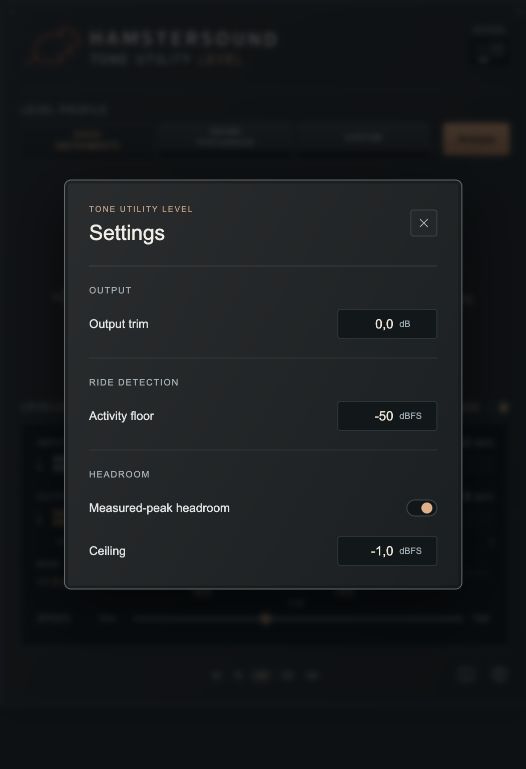
Output trim adds a deliberate final offset from −12 to +12 dB. Measured-peak headroom caps planned total gain using the highest sample peak in your saved analysis: fixed correction, Ride and Output trim together.
Ceiling sets the planning ceiling when Headroom is on. LEVEL may apply less gain than the RMS target requests. A lower target can be a better fit for the available headroom.
Headroom is not a limiter. Later, higher peaks can exceed the planned ceiling. Intersample peaks are not measured; there is no true-peak guarantee.
NEUTRAL GAIN PROCESSING
LEVEL contains no EQ, saturation, console model or limiter. With Ride off and gain settled, processing is a clean level change. Ride on deliberately changes the dynamics of the performance.
The development VST3 was tested in stereo at 44.1, 48 and 96 kHz with multitone and noise, +12 dB static gain, Ride off and Headroom off. After settling, residual RMS against ideal gain was around −173 to −175 dBFS: float rounding for these signals and settings. Native impulse tests measure 0 added samples. Total computer, interface and DAW latency depends on the rest of your system.
LEVEL is the first plugin in the TONE Utility range. More handy plugins that make everyday studio work easier will follow.
Coming soon. LEVEL is in development. The current development VST3 0.1.1 supports macOS 11 or later, Intel and Apple Silicon. The new interface shown is a design preview; a customer release will follow.
Back to TONE Utility →