HAMSTERSOUNDSTUDIO & PLUGINS

TONE Compact / COMP

TONE Compact

TONE Compact COMP

Shape dynamics. Stay in control.

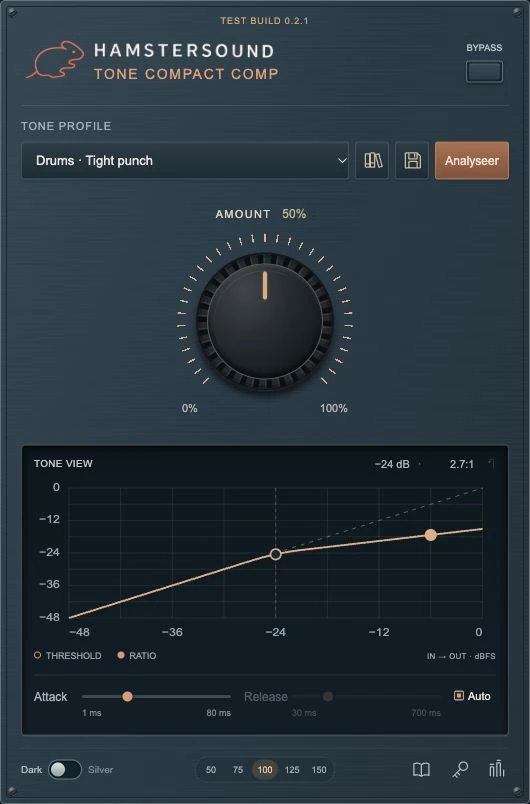
Let your recording define the starting point and choose a dynamics profile. Blend with AMOUNT, then refine threshold, ratio, attack and release.

€ 49,00 incl. VAT

LEVELVIEW is collapsed by default. Open it with the button above.

TONE Compact COMP, Dark, LEVELVIEW collapsed
Interface example · illustrative readings. Dark and Silver have the same controls and processing.

TONEVIEW / LEVELVIEW

Hear it. See it. Shape it.

TONEVIEW shows the processing inside the plugin. LEVELVIEW adds a separate level-meter panel when you need it. Keep the interface compact or open the meters for a closer look.

TONEVIEW

See how your dynamics change.

TONEVIEW shows the relationship between input and output level. Threshold sets where compression starts; ratio sets how strongly it acts. Adjust those points in the plugin and refine the response with attack and release.

LEVELVIEW

Keep an eye on your levels.

LEVELVIEW is the meter panel that opens beside the plugin. Read the stereo input and output levels in dBFS, check peaks and adjust the input and output trims. This helps you compare the processed and original sound at a similar level. The separate GR meter shows how many dB of gain reduction are being applied.

Use the Dark, Silver version and LEVELVIEW buttons above to compare the interface views. The readings in these images are illustrative; the controls here change the picture.

Your sound. Your adjustments.

Formats & compatibility

macOS · Audio Units (AU) / VST3. Use a DAW that supports your chosen plugin format.

Dark / Silver · 50%, 75%, 100%, 125%, 150% · TONEVIEW / LEVELVIEW

Discover TONE Profiles and shared experiences

TONE Compact COMP

€ 49,00 incl. VAT

← All Compact plugins